
MagSpoof Complete
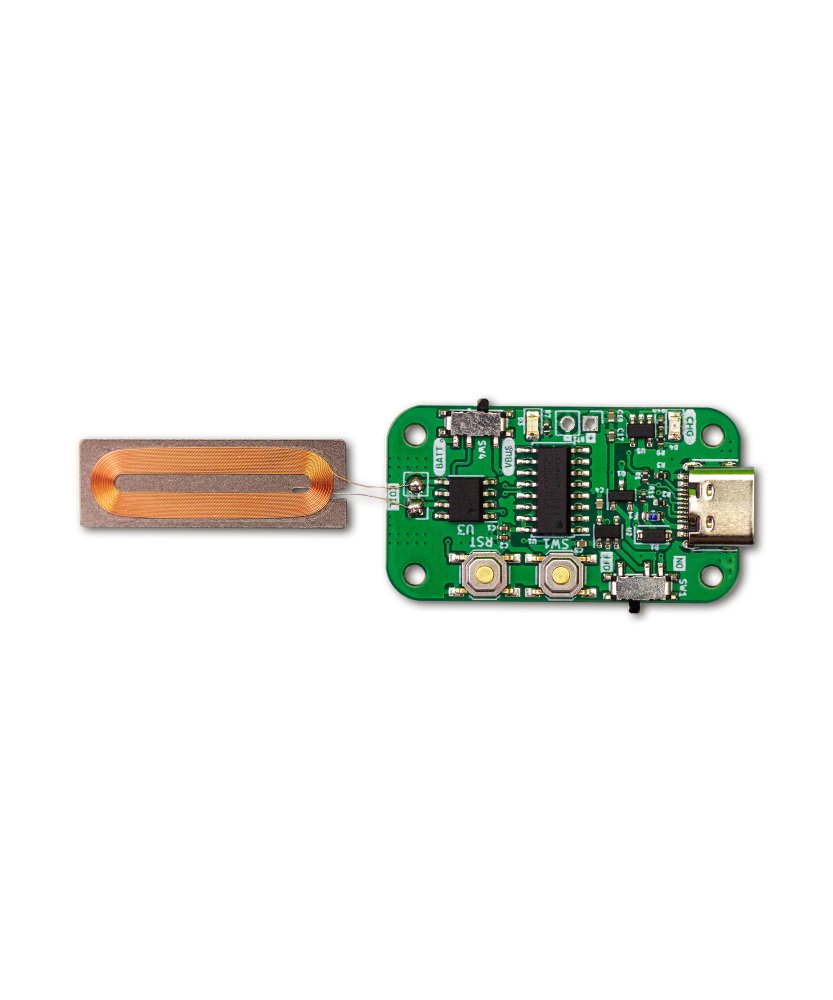
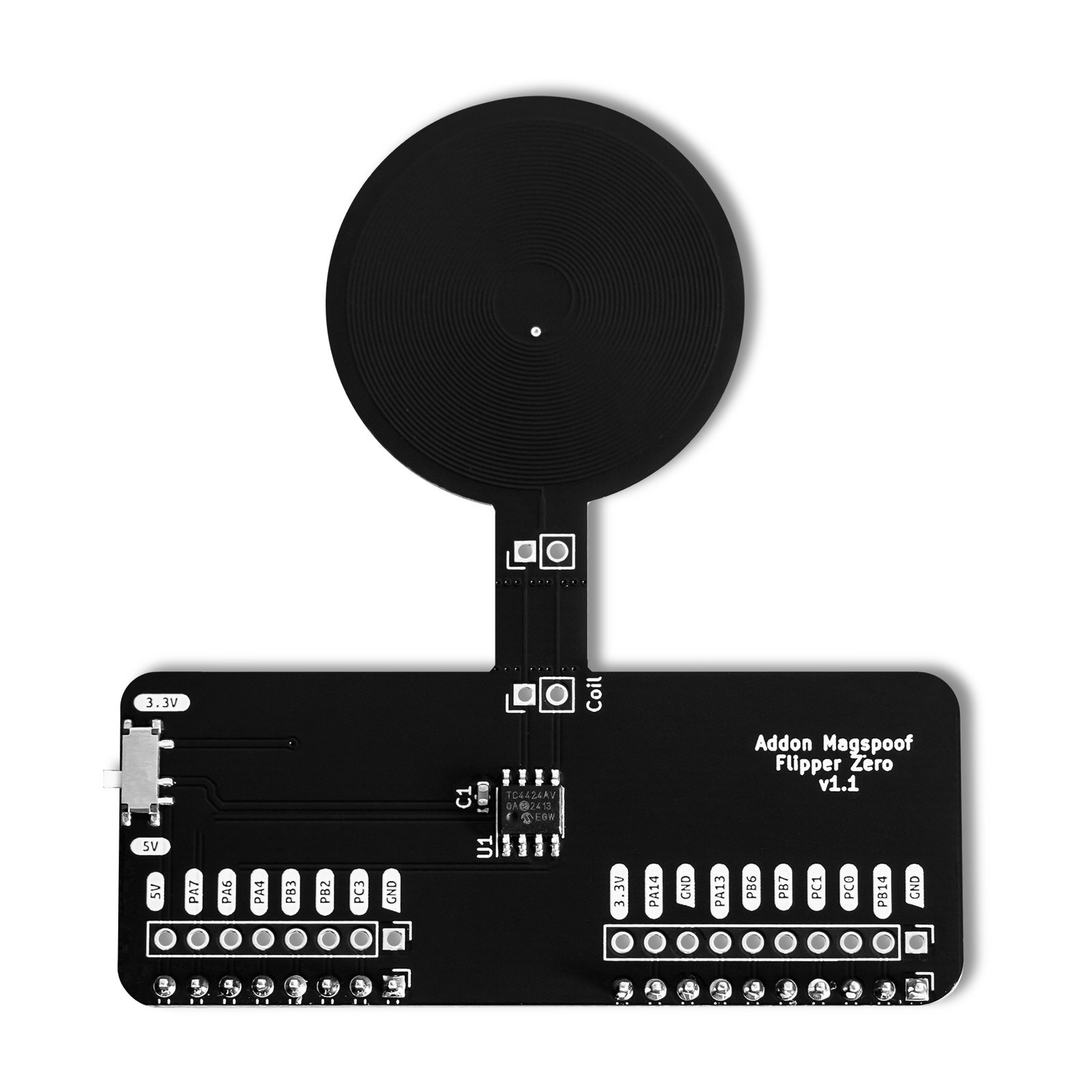
Two ways to replay a magstripe you are authorized to test: the standalone MagSpoof V4 card, and the MagSpoof add-on for your Flipper Zero.
$38.00 Original price was: $38.00.$34.00Current price is: $34.00.
In stock
- Flipper Zero — the add-on attaches to it, sold separately
- Unleashed firmware, for the Flipper add-on half
- USB magstripe reader on a PC, to read the tracks first
- MagSpoof Web Serial Client in the browser, for the V4 card
In the box
Flipper Add-On MagSpoof board — its antenna coil is integrated in the PCB
Not included
A USB magstripe card reader
A coil for MagSpoof V4
A case for either board — 3D-printable STL files are in the GitHub repos
You also need
A USB magstripe card reader connected to a computer, to read the Track 1/2 data of the card you are authorized to emulate
A coil wired to MagSpoof V4’s coil pins — V4 does not integrate the antenna into the PCB
A browser for the MagSpoof Web Serial Client, or a serial terminal (PuTTY on Windows, Minicom on Linux/macOS)
A card, reader or terminal you are authorized to test
- 115 GitHub Stars
- MagSpoof add-on shown at DEF CON · HackGDL · BugCon
- Designed and built in Aguascalientes, Mexico
- Hardware CERN-OHL v1.2 · firmware AGPL-3.0 (V4) and MIT (Flipper app)
What is MagSpoof Complete?
MagSpoof Complete is a two-board pack for magnetic stripe testing: the standalone MagSpoof V4 card and the Flipper Add-On MagSpoof. Both emulate a magstripe card wirelessly, generating an electromagnetic field that a standard magstripe reader picks up without a physical swipe and without NFC or RFID, and both are built for authorized security audits. MagSpoof V4 runs on its own: power it over USB-C or a single-cell battery, then save and play tracks through its preloaded Serial CLI from a browser or a serial terminal. The Flipper Add-On MagSpoof attaches to a Flipper Zero and is driven by the MagSpoof app on the device, with Unleashed firmware installed. Either way, you first read the card’s tracks with a USB magstripe reader connected to a computer.
Test a magstripe reader you are authorized to audit
Run the same test from the Flipper Zero in your pocket
Run a workshop with two magstripe stations
Start in 10 minutes
- Read the card’s tracks. Connect a USB magstripe reader to your computer, open a plain-text editor and swipe the card you are authorized to test — Track 1 and Track 2 read out as text (the wiki walks through every Format B field).
- MagSpoof V4: power it up. Set the power-source switch to VBUS (USB) or BATT (battery), then the ON/OFF switch to ON — the preloaded Serial CLI starts on its own.
- MagSpoof V4: save and play. From the MagSpoof Web Serial Client or a serial terminal, send
sto save the tracks andp1/p2/pto play them. - Flipper add-on: load the file. Flash Unleashed firmware with qFlipper, fill the tutorial’s
.magtemplate with your track data and copy it to the Flipper’smagfolder (see the full tutorial). - Flipper add-on: emulate. Attach the board, open the MagSpoof app, select your file under Saved Cards, set the tracks in Config and press Send.
| Pack contents | MagSpoof V4 board, Flipper Add-On MagSpoof board |
|---|---|
| MagSpoof V4 microcontroller | CH552G — enhanced E8051 core, MCS51 instruction set, up to 24 MHz |
| MagSpoof V4 memory | 16 KB EEPROM for saved tracks · 1 KB xRAM · 256 B iRAM |
| MagSpoof V4 power | Single-cell Li-Ion/LiPo battery or USB-C · 3.3 V I/O (never apply more than 3.3 V to digital/analog pins) |
| MagSpoof V4 connectors & controls | USB-C · UART pins · SWD pins · battery pins · coil pins · status LED · CHRG LED · ON/OFF switch · BATT/VBUS switch |
| MagSpoof V4 antenna | External coil wired to the coil pins (integrated into the PCB only from V5 on) |
| MagSpoof V4 firmware | Preloaded Serial CLI (h · s · p1/p2/p · l · d · e), auto-starts on power-up — latest release v5.5.2.0 |
| Add-On TX driver | TC4424 chip — amplifies the Flipper Zero's pulses to the coil, no physical swipe needed |
| Add-On antenna | Coil integrated in the PCB |
| Add-On power switch | 3.3V (Flipper without USB power), 5V (external/USB power — longer wireless range) |
| Magstripe tracks | Track 1 and Track 2, Format B — the V4 card transmits them sequentially; the Flipper add-on emulates Track 1+2 together |
| Licenses | Firmware GNU AGPL v3.0 · Hardware CERN Open Hardware Licence v1.2 |